1. From Run / Command Prompt, type slui 4.
*Other options
slui 2 = Show activation status
slui 3 = Activation via Internet
slui 4 = Activation via phone
slui 5 = Show all activation methods
slui 6 = Activation wizard
slui 7 = Simulate last day activation
Tuesday, 8 January 2019
Wednesday, 2 January 2019
#WSUS - The operation being requested was not performed because the user has not logged on to the network. The specific service does not exist. (0x800704DD)
Event Error:
Content file download failed.
Reason: The operation being requested was not performed because the user has not logged on to the network. The specific service does not exist. (0x800704DD)
WSUS error:
The files for this update failed to download. The update can be approved but will not be available to computers until the download is complete. Click Retry Download to start the download again.
Solution:
1. Confirm log on user for WSUS services and BIT services is correct.
WSUS service:
User: NT AUTHORITY\NetworkService
Pass: Blank
Bit services:
User: Local System account (must run local system account)
2. After change the log on user, Restart both Services and retry download.
Saturday, 1 December 2018
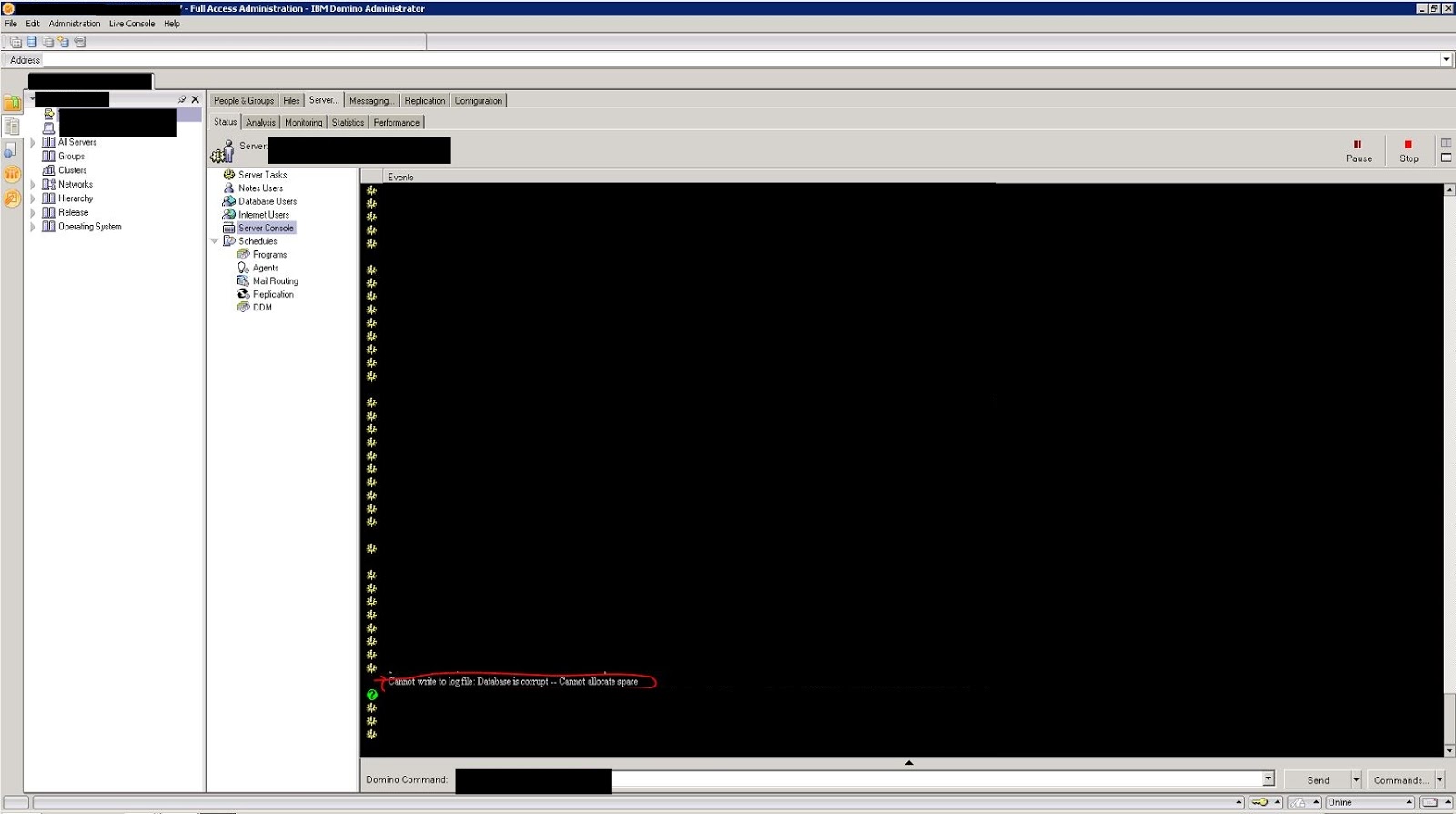
#Lotus Domino Cannot Write To Log File
Error: Cannot write to log file: Database is corrupt --cannot allocate space
Re-create new log.nsf
1. Close the Lotus Domino Administrator console.
2. Go to Lotus Domino installation location.
Example: D:\Lotus\Domino\Data
3. Backup the log.nsf file, and then delete the log.nsf. (new log.nsf will create automatically)
4. Re-run the command.
Re-create new log.nsf
1. Close the Lotus Domino Administrator console.
2. Go to Lotus Domino installation location.
Example: D:\Lotus\Domino\Data
3. Backup the log.nsf file, and then delete the log.nsf. (new log.nsf will create automatically)
4. Re-run the command.
Saturday, 10 November 2018
#Lotus Domino Outgoing Mail Pending
#Lotus Domino send mail not being received
#Lotus notes sending but not receiving
You can check the pending email as below:-
Method: Restart server mail router
1. From Lotus Domino Administrator's server console, run command below.
Tell router quit
load router
2. Make sure both command completed without error.
3. Verify is the mail start to send out. This may take some time. You also can check from Server Console.
Tuesday, 30 October 2018
Restore Deleted Microsoft Active Directory Object
1. On AD server, open LDP utility
Under run, type ldp.exe.
2. Connect domain
Under Connection, select Connect.
Confirm the domain name and click OK.
3. Bind with the admin user
Under Connection, select Bind.
Enter the admin username and password. Then click OK.
4. Show the Tree
Under View, select Tree.
Click OK.
5. Restore the object
Expand the CN=Deleted Objects
Search for the delete object you wish to restore. Right click on the object and select Modify.
Under Edit Entry Attribute, enter isDeleted, select delete and then click Enter.
Then change the value below, select Replace and then click Enter.
Edit entry Attribute: distinguishedName
Values: CN:=username,DC=domainname,DC=domainname
(Example: CN:=darren,DC=contoso,DC=local)
Confirm the Entry List, and then click Run.
Wednesday, 4 April 2018
#IBM Lotus Control
The installation of the IBM Lotus Control has been blocked or declined.
Do you want to use the IBM Lotus Control on new messages ?
Solution
Install IBM Lotus Control ActiveX manually. (You can get the installer in Domino Lotus server)
Example: C:\program files\Lotus\Domino\Data\domino\html\IBM_Lotus_iNotes_ActiveX_Installer_8.5.3.msi.
Do you want to use the IBM Lotus Control on new messages ?
Solution
Install IBM Lotus Control ActiveX manually. (You can get the installer in Domino Lotus server)
Example: C:\program files\Lotus\Domino\Data\domino\html\IBM_Lotus_iNotes_ActiveX_Installer_8.5.3.msi.
Tuesday, 3 April 2018
#IBM Lotus iNotes Loading hang in Internet Explorer
Loading IBM Lotus iNotes......
Loading IBM Lotus iNotes hang after login (internet explorer)
Solution
1. Add to IE compatibility view.
2. IE Security Settings.
.NET Framework
- Loose XAML - Enable
- XAML browser applications - Enable
- XPS documents - Enable
.NET Framework-reliant components
- Permission for components with manifests - High Safety
- Run components not signed with Authenticode - Enable
- Run components signed with Authenticode - Enable
ActiveX controls and plug-ins
- Allow ActiveX Filtering - Disable
- Allow previously unused ActiveX controls to run without prompt - Enable
- Allow Scriptlets - Enable
- Automatic prompting for ActiveX controls - Enable
- Binary and script behaviors - Enable
- Display video and animation on a webpage that does not use external media player - Disable
- Download signed ActiveX controls - Prompt
- Download unsigned ActiveX controls - Prompt
- Initialize and script ActiveX controls not marked as safe for scripting - Prompt
- Only allow approved domains to use ActiveX without prompt - Disable
- Run ActiveX controls and plug-ins - Enable
- Run antimalware software on ActiveX controls - Disable
- Script ActiveX controls marked safe for scripting* - Enable
- File download - Enable
- Font download - Enable
- Enable
Miscellaneous
- Access data spurces across domains - Enable
- Allow dragging of content between domains into separate windows - Disable
- Allow dragging of content between domains into the same windows - Disable
- Allow META REFERSH - Enable
- Allow scripting of Microsoft wen browser control - Enable
- Allow script-initiated windows without size or position constraints - Enable
- Allow teh TDC Control - Enable
- Allow webpages to use restricted protocals for active content - Prompt
- Allow websites to open windows without address or status bars - Enable
- Display mixed content - Prompt
- Don't prompt for client certificate selection when only one certificate exists - Enable
- Drag and drop or copy and paste files - Enable
- Enable MIME Sniffing - Enable
- Include local directory path when uploading files to a server - Enable
- Launching applications and unsafe files - Enable
- Launching programs and files in an IFRAME - Prompt
- Navigate windows and frames across different domains - Enable
- Render legacy filters - Enable
- Submit non-encrypted form data - Enable
- Use Pop-up Bloker - Disable
- Use Windows Defender SmartScreen - Disable
- Userdata persistence - Enable
- Websites in less privileged wen content zone can navigate into this zone - Enable
- Active scripting - Enable
- Allow Programmatic clipboard access - Enable
- Allow status bar updates via script - Enable
- Allow websites to prompt for information using script windows - Enable
- Enable XS filter - Disable
- Scripting of Java applets - Enable
Subscribe to:
Posts (Atom)